Hardware-Aware Tier Engine
Reads real 64-bit GPU VRAM, CPU core topology, RAM capacity, and NVMe vs. HDD storage so a 4 GB laptop and a 16 GB desktop get completely tailored recommendations.
A modern, transparent Windows gaming optimizer crafted for both older low-spec laptops and high-refresh competitive PCs. Tune 36 documented Windows settings, clear standby RAM hitches, and reverse anything in one click with SkyGuard.
 SkyTweaks — Windows Gaming & Performance Optimizer
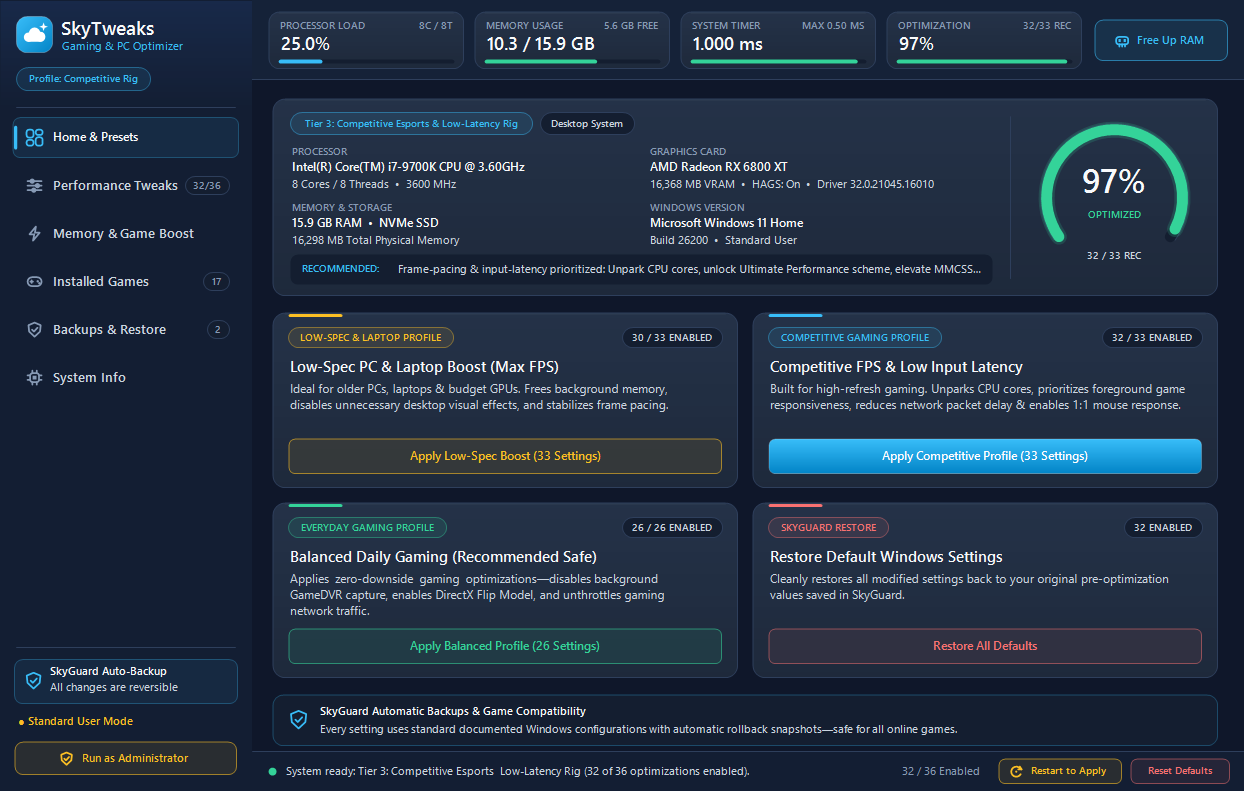
Reads real 64-bit GPU VRAM, CPU core topology, RAM capacity, and NVMe vs. HDD storage so a 4 GB laptop and a 16 GB desktop get completely tailored recommendations.
Whenever you choose a kernel or display setting that needs a reboot (MPO fix, HAGS, input queues), SkyTweaks lights up a clean Restart button directly on the card and header.
Before changing any registry key, service, or power scheme, SkyGuard saves your exact prior value to JSON snapshots plus supports native Windows System Restore Points.
Uses Windows' own ntdll.dll and psapi.dll APIs to reclaim gigabytes of cached Standby Page List memory and stale GPU shader caches without third-party drivers.
Auto-discovers installed games to configure IFEO High CPU/IO priority, dedicated GPU preference, and Unreal Engine scalability presets with automatic .bak restore files.
No Electron runtime, no telemetry, no tray process left running after close. Opening SkyTweaks even closes any older running instance automatically.
Select your PC specs below to preview the exact hardware tier, recommended tweak count, and top optimizations SkyTweaks will pick for your system.
Prioritizes 1% low frame-time consistency, unparked CPU cores, zero network packet throttling, and crisp 1:1 mouse linearity.
Toggle switches live, inspect exact Windows registry keys & commands, and see how SkyTweaks surfaces the Restart to Apply button whenever you choose a reboot-required tweak.
Windows caches recently read files inside the Standby Page List. On 8 GB and 16 GB gaming systems, that cache silently fills available memory until a game demands a sudden texture load — causing a sharp frame drop.
SkyTweaks calls Windows' built-in NtSetSystemInformation memory list command to release stale Standby cache and idle background working sets on demand — no kernel drivers required.
Too many "PC boosters" hide behind obfuscated code, shady installers, or risky hooks. SkyTweaks uses documented Windows APIs and records every single prior state before changing a byte.
SkyTweaks never attaches to running game processes, never hooks DirectX or mouse inputs, and installs zero kernel drivers. Per-game priority uses Windows' native IFEO registry key.
Every toggle captures your exact original registry value, service start mode, or power GUID in %APPDATA%\SkyTweaks\. Restore a snapshot or reset everything to Windows stock in one click.
.bak files before every game .ini editEvery line of source code is plain, readable C# targeting Windows' built-in .NET Framework 4.8 compiler. No hidden binaries, no telemetry servers, no background updater.
Free, open-source MIT license. Works on Windows 10 & Windows 11 (64-bit) with zero extra downloads.
Just download and double-click SkyTweaks.exe. Zero installation needed.
be2884e3834e6e57c940d2d3ba14581915bed88ac7d198a3920f7c0c0a6ea6b5
Includes SkyTweaks.exe, full C# source tree, build.bat, and documentation.
5e47daf3d748b308d51e222d5b53123f1b1bf56c9732973a1e7a4b489936c6b6
(Get-FileHash .\SkyTweaks.exe -Algorithm SHA256).Hash.ToLower()
# Expected v1.1.0:
# be2884e3834e6e57c940d2d3ba14581915bed88ac7d198a3920f7c0c0a6ea6b5In the Windows desktop app, clicking Restart Now opens this safe confirmation before scheduling a clean 5-second restart for: